Author
Kirsten Pleskot
When we write code, we rarely think about what is actually happening under the hood of our computer. Knowing how things really work is incredibly useful when you write low-level languages, read assembly, or do binary analysis. In this blog post you will learn the basics of RISC-V assembly, how common C patterns map to assembly, and a little bit about the operating systems your code runs on.
One of the biggest revelations you can have as a programmer is that computers are not all that smart. All they really know how to do is process instructions sequentially, one after another. We call these instructions, and each instruction is extremely simple: multiply these two values, move this value from here to there, jump to that other set of instructions.
In the simplest possible form, a computer looks something like this:
Instruction *instructions = ...
CPU cpu = CPU {
    .pc = ...
    // other cpu properties
};
while (true) {
    Instruction ins = instructions[cpu.pc];
    switch(ins.opcode) {
        // do stuff
    };
    cpu.pc++
}The array instruction mentioned above is a sequence of instructions stored in some binary format that encodes what the processor should do.
For RISC-V each instruction is a 32-bit number.
For example, the number 0x02050593 adds 32 to register a0 and stores the result in register a1.
That might not make much sense until we look at the number in binary, where we can see the individual parts of the instruction that define this behavior.
0b000000100000 01010 000 01011 0010011
  |            |     |   |     |
  immedieate   rs1   alu rd    opcode
The opcode 0010011 (operation code) tells the processor this is an ALU Immediate operation.
rd is where the result should be stored.
alu specifies which operation the ALU should perform—in this case 000 means addition.
rs1 denotes the source register the CPU uses (resource), and immediate is an immediate value acting as the second source.
Thankfully we no longer have to write instructions like this manually.
Instead we write a textual representation such as addi a1, a0, 32 and another program, called an assembler, turns that text into binary.
If you want to read more about how instructions are encoded, you can do so here.
A short note on assembly languages
Every computer has its own instruction set: RISC-V, x86, ARM, … Because an assembler maps directly to binary code, every architecture effectively has its own assembly “language”. The assembly used in this post is RISC-V, specifically riscv64gc. RISC-V assembly is pleasantly simple, so you can understand all the important concepts without drowning in complexity (looking at you, x86).
You need a basic grasp of assembly syntax for the following examples.
addi a1, a0, 32, add a1, a2, a3, or call printf. They eventually become machine code..section, which tells the assembler how to interpret symbols, and .globl, which makes symbols visible.One thing that makes RISC-V assembly so readable is the naming of its registers.
RISC-V has 32 general-purpose registers named x0 through x31, but they also have “ABI names”.
The usefulness of those names becomes more obvious when we talk about the calling convention.
One of the most important registers is x0, also known as zero.
Reading from this register always returns zero, and writing to it is ignored.
This is useful because it lets us express a lot of behavior without needing special instructions.
Other important registers are the aX registers that hold function arguments and the sX registers that are easier to preserve (more on that later).
Here is a table of all registers you can reference later:
| Register | ABI | Usage | Preserved across calls |
|---|---|---|---|
| x0 | zero | always returns zero, ignores writes | n/a |
| x1 | ra | return address for jumps | no |
| x2 | sp | stack pointer | yes |
| x3 | gp | global pointer | n/a |
| x4 | tp | thread pointer | n/a |
| x5 | t0 | temporary register 0 | no |
| x6 | t1 | temporary register 1 | no |
| x7 | t2 | temporary register 2 | no |
| x8 | s0 or fp | saved register 0 / frame pointer | yes |
| x9 | s1 | saved register 1 | yes |
| x10 | a0 | return value or argument 0 | no |
| x11 | a1 | return value or argument 1 | no |
| x12 | a2 | argument 2 | no |
| x13 | a3 | argument 3 | no |
| x14 | a4 | argument 4 | no |
| x15 | a5 | argument 5 | no |
| x16 | a6 | argument 6 | no |
| x17 | a7 | argument 7 | no |
| x18 | s2 | saved register 2 | yes |
| x19 | s3 | saved register 3 | yes |
| x20 | s4 | saved register 4 | yes |
| x21 | s5 | saved register 5 | yes |
| x22 | s6 | saved register 6 | yes |
| x23 | s7 | saved register 7 | yes |
| x24 | s8 | saved register 8 | yes |
| x25 | s9 | saved register 9 | yes |
| x26 | s10 | saved register 10 | yes |
| x27 | s11 | saved register 11 | yes |
| x28 | t3 | temporary register 3 | no |
| x29 | t4 | temporary register 4 | no |
| x30 | t5 | temporary register 5 | no |
| x31 | t6 | temporary register 6 | no |
| pc | none | program counter | n/a |
Each register is 64 bits wide. Register width dictates what size of data instructions can operate on—the so-called word size.
In this section I will show you how common C patterns translate to assembly.
Each example shows C code and the resulting assembly.
If you have your own RISC-V VM or toolchain you can obtain the assembly with clang main.c -o main.asm -S -Oz.
An alternative I prefer is Compiler Explorer.
The most basic operation in programming is assigning values to variables: int x = 60.
All RISC-V instructions are 32 bits long, but we often need to load 64-bit data into registers.
That means loading a single number may require multiple instructions.
When writing assembly by hand we can use the li pseudo instruction, which the assembler expands into however many instructions are needed to load that number.
long ret_big_num() {
    return 9999999999999;
}
ret_big_num:
li a0, 9999999999999 ; a0 = 9999999999999
ret ; return a0The assembler expands this into the following instructions:
ret_big_num:
    lui     a0, 298023
    addiw   a0, a0, 917
    slli    a0, a0, 13
    addi    a0, a0, -1
retArithmetic instructions are among the most frequently used ones.
What else are computers for if not computing?
The syntax is usually operation output_reg, input_reg, 12bit_imm or operation output_reg, input_reg, input_reg.
Here are some common arithmetic operations and their instructions:
long operations(long x, long y) {
  x = x - y;
  x = x * y;
  x = x << y;
  x = x >> y;
  x = x + y;
  return x;
}
operations:
; x is in a0
; y is in a1
sub a0, a0, a1 ; x = x - y
mul a0, a0, a1 ; x = x * y
sll a0, a0, a1 ; x = x << y
sra a0, a0, a1 ; x = x >> y
add a0, a0, a1 ; x = x + y
retJumps and branches let us modify control flow. Loops, if statements, and switches all compile down to jumps and branches.
A while(true) loop compiles into an unconditional jump.
int main() {
  long x = 0;
  while (true) {
    x = x + 1;
  }
  return 0;
}
main:
; ... omitted for readability
li a0, 0 ; long x = 0
.loop: ; this is label which we can reference as address
addi a0, a0, 1 ; x = x + 1
j .loop ; jump back to .loopIf statements compile into conditional jumps. Notice how the compiler rearranged operations to keep the code short. I added extra comments to make the sample easier to follow.
long ifs(long b) {
  long num = 14;
  if (b == 55) {
    num = 15;
  } else if (b == 73) {
    num = 36;
  }
  return num;
}
ifs:
; b is in a0
mv a1, a0 ; a1 = b
addi a2, a0, -73 ; a2 = b - 73
li a0, 36 ; a0 = 36 (num = 36)
; now num is equal to 36
; if b is equal to 73 the program jumps to the label .eq_to_73
; and skips the loading of 14 into num
beqz a2, .eq_to_73 ; if a2 == 0 (b == 73) jump to .eq_to_73
li a0, 14 ; a0 = 14 (num = 14)
.eq_to_73:
; at this point num is equal to 36 if b is equal to 73 else it's 14
addi a1, a1, -55 ; a1 = b - 55
; if b is not 55 it just jumps to the .return label
; the correct value is already loaded for cases when b is not 55
bnez a1, .return ; if a1 != 0 (b != 55) jump to .return
; if b is 55 we load 15 to num
li a0, 15 ; a0 = 15 (num = 15)
.return:
ret ; return numThe instruction j .label does not actually exist; it is a pseudo instruction.
It expands into jal zero, .label.
zero is the register where we store the address we are jumping from.
Storing the address allows us to return to the place we jumped from.
Here we simply discard the address by “storing” it in the zero register.
The last part is the offset from the current instruction to the jump target.
The assembler calculates that offset.
There is also jalr rd, rs1, offset, which adds offset to rs1 and stores the current address in rd, enabling much longer jumps.
Conditional jumps are also called branches because execution branches into multiple possible states.
The branching instruction bnez a1, .return is another pseudo instruction that expands into bne a1, zero, .return.
a1 and zero are the operands, bne stands for “branch if not equal”, and .return is the label used to compute the offset.
Branch instructions include beq for equality, bne for inequality, blt and bltu for less-than comparisons on signed and unsigned integers, and bge and bgeu for greater-or-equal comparisons on signed and unsigned integers.
Additional branch pseudo instructions exist as well.
The category of “other” instructions includes, well, almost everything else.
Examples include instructions that interact with processor state, such as csrrw.
There is also the ecall instruction, which asks the kernel to do something for you.
Breakpoint or “fence” instructions live here too.
If you want to dive deeper into these instructions, you can do so here.
Pseudo instructions are instructions the compiler rewrites into other instructions to give us behavior not directly provided by the ISA. Examples include:
nop: does nothingla: loads an address into a registerli: loads a constant into a registercall: calls a function (more on this later)ret: returns from a functionbeqz, bnez, bgez, bgt, ble, … loads of branching helpersSo far we have only talked about simple variables such as long int x = 0, but not about pointers or arrays.
A pointer is a variable containing the address of memory holding the data we care about.
To write to that address we use the sd instruction.
void deref(long *ptr) {
    *ptr = 5;
}
deref:
; ptr is in a0
li a1, 5 ; a1 = 5
sd a1, 0(a0) ; *ptr = a1
retThe first argument is the register holding the data we want to store—5, which we loaded into a1.
The second argument is the register holding the address we are writing to, here the argument a0 containing the pointer ptr.
There is a third argument outside the parentheses around the second argument, 0(a0).
That argument is a constant offset from the address register, in bytes.
Here it is zero because we want to store directly at that address without an offset.
The arguments therefore follow the pattern data register, offset(address register).
A non-zero offset means we want to write at a fixed offset from the pointer.
void deref(long *ptr) {
    ptr[3] = 5;
}
deref:
; ptr is in a0
li a1, 5 ; a1 = 5
sd a1, 24(a0) ; *(ptr+24) = 5
retThe value 24 is computed by multiplying the type size in bytes by the index: (sizeof(long) / 8) * 3; the offset is then added to the base address.
The previous example and the next one compile into identical assembly:
void deref_add(long *ptr) {
  ptr += (sizeof(long) / 8) * 3;
  *ptr = 5;
}
deref_add:
li a1, 5
sd a1, 24(a0)
retIf we don’t know the index at compile time, we must compute the offset from the base address at runtime.
void mutate(long *ptr, long index) {
    ptr[index] = 5;
}
mutate:
; ptr is in a0
; index is in a1
slli a1, a1, 3 ; index = index << 3 // equivalent to index = index * 8
add a0, a0, a1 ; ptr = ptr + index
li a1, 5 ; a1 = 5
sd a1, 0(a0) ; *ptr = 5
retReading from memory uses almost the same syntax and patterns as writing.
Arguments are ordered target register, offset(address register).
The first register receives the data loaded from memory, the second register holds the address to load from, and the offset is the byte offset from the base.
long load(long *ptr) {
    return *ptr;
}

long load_s_idx(long *ptr) {
    return ptr[3];
}

long load_idx(long *ptr, long index) {
    return ptr[index];
}
load:
; ptr is in a0
ld a0, 0(a0) ; a0 = *ptr
ret ; return a0
load_s_idx:
; ptr is in a0
ld a0, 24(a0) ; a0 = *(ptr+24)
ret ; return a0
load_idx:
; ptr is in a0
; index is in a1
slli a1, a1, 3 ; index = index * 8
add a0, a0, a1 ; ptr = ptr + index
ld a0, 0(a0) ; a0 = *ptr
ret ; return a0Functions are one of the most useful abstractions in programming.
Without them, our programs would devolve into chaos instantly.
Luckily we can use functions in assembly too, thanks to the call and ret instructions.
Functions in other languages consist of several parts:
// list of arguments
int add_one(int x) {
    // body of the function
    x = x + 1;
    // optionally return a value
    return x;
}
/*
 * ...
 */

// calling the function and passing arguments
add_one(3) // -> 4
Unfortunately in assembly we do not have the luxury of writing add_one(3) and expecting everything to land in the right place.
We must do everything instruction by instruction.
The best RISC-V offers is the call instruction, which stores the return address, and ret, which jumps back to it.
We must handle the rest—placing arguments and the return value—ourselves.
Since we need a fixed recipe to follow whenever we call a function, ideally one that works for library code as well, we need a contract that both caller and callee follow.
That contract defines where to put arguments and the return value and how to treat registers.
Thankfully smart people already designed this contract. It is called a calling convention (or “callconv” for short). Some languages define their own calling conventions, often poorly documented. To make matters worse, calling conventions can differ between operating systems. The one I will cover here is the Linux calling convention.
A function call consists of the following steps:
call or the architecture-specific equivalent. This usually stores the current program counter and sets the program counter to the function’s address.ret, which jumps back to the return address.Small functions that use only a few registers can skip much of this process, and leaf functions (those that do not call other functions) can often skip it entirely.
Let’s examine a function step by step:
long sum_and_print(long x, long y) {
  long sum = x + y;
  printf("%li\n", sum);
  return sum;
}
Here is the resulting assembly with additional commentary:
sum_and_print:
    ; This is called function prologue
    ; It saves return address if needed,
    ; saves callee saved registers it wants to use.
    ; The process of putting registers on stack is called spilling
    addi    sp, sp, -16 ; makes place on stack
    sd      ra, 8(sp)   ; spills return address to stack
    ; s0 is callee saved register which the function wants to use so it has to be spilled so it's state can be restored.
    sd      s0, 0(sp)   ; spills s0 to stack.
    ; this is the actual body of the function
    add     s0, a1, a0  ; sum = x + y
    ; this label and next to instruction is RISC-V pattern to load address of other label into register
    ; This pattern is used when dealing with position independent code
    ; This loads the address of the string "%li" to the a0 argument register where the function printf expects the first argument
.Lpcrel_hi0:
    auipc   a0, %pcrel_hi(.L.str)
    addi    a0, a0, %pcrel_lo(.Lpcrel_hi0)
    ; this moves the sum variable to a1 where printf expects the second argument
    mv      a1, s0
    ; call is pseudo instruction
    ; the call instruction saves the current value of pc register to ra register
    ; and jumps to the address of the function
    call    printf
    ; the function resumes execution after printf
    ; put the content of s0 register to the a0 register
    ; we can expect the s0 register to have the same value as before the call to printf
    mv      a0, s0
    ; This is function epilogue it undoes the steps the prologue did.
    ; Resotore the original state of the registers
    ld      ra, 8(sp)
    ld      s0, 0(sp)
    ; restores the state of the stack
    addi    sp, sp, 16
    ; ret is pseudo instruction
    ; it jumps to the address in ra register
    ret

.L.str:
.asciz "%li\n"The pre-call setup happens immediately before printf() is invoked:
    auipc   a0, %pcrel_hi(.L.str)
    addi    a0, a0, %pcrel_lo(.Lpcrel_hi0)
    mv      a1, s0
    call    printf
During setup the arguments are placed into the designated locations.
Word-sized arguments are passed in a0 through a7.
Arguments that take two words occupy two registers.
Larger arguments go on the stack and are passed by reference.
Any leftover arguments also go on the stack.
The first argument (the string "%li\n") is passed by reference (the first parameter of printf is char *x, so it expects a pointer).
The instructions auipc and addi with %pcrel_hi/%pcrel_lo load addresses position-independently. If we wrote assembly by hand, we would likely use the la pseudo instruction.
The second argument moves into register a1 from register s0, where the sum is stored.
More complex type signatures require more pre-call work.
Once the function resumes execution, the ra register (which holds the return address) is restored.
It had to be saved because calling printf() overwrites the register.
The prologue and epilogue appear directly inside sum_and_print:
sum_and_print:
    addi    sp, sp, -16
    sd      ra, 8(sp)
    sd      s0, 0(sp)

    ; ...

    ld      ra, 8(sp)
    ld      s0, 0(sp)
    addi    sp, sp, 16
    ret
The instruction addi sp, sp, -16 reserves 16 bytes on the stack.
sp (the stack pointer) points to the top of the stack.
The stack grows downward (on most architectures) and must always be aligned to 16 bytes, so we always subtract a multiple of 16.
We then store any registers we are obligated to preserve (callee-saved registers, marked as “preserved” in the table) if we plan to use them.
This process is called spilling.
Spilling makes using saved registers convenient because we simply store them in the prologue, restore them in the epilogue, and trust they will hold the same value even across nested calls.
If the function needed stack space for local variables, it would reserve it in this step.
The function body executes next.
By the time it finishes, the return value must be placed in the designated location.
For this function, that location is register a0.
If the return value is two words long, it goes into a0 and a1.
If it is larger, the caller must allocate memory ahead of time and pass the address as argument a0, shifting all other arguments accordingly.
The epilogue undoes the prologue, including shrinking the stack and restoring spilled registers.
Then ret jumps back using the address stored in ra.
In the examples above none of these steps were necessary because those functions are leaf functions—they do not call any other functions.
Since they never call out, they never need to store registers, and they can use only temporary tX and argument aX registers for intermediate values.
The stack is one of the most important concepts to understand—and to build intuition for—when working with assembly. Whether you’re debugging or doing binary exploitation, stack intuition makes life easier.
Let’s walk through a few examples to see how the stack behaves in different situations.
long sum_and_print(long x, long y) {
  long prod = x + y;
  printf("%li\n", prod);
  return prod;
}

int main() {
  long x = sum_and_print(25, 17);
  return x;
}
sum_and_print:
addi sp, sp, -16
sd ra, 8(sp)
sd s0, 0(sp)
add s0, a1, a0
.Lpcrel_hi0:
auipc a0, %pcrel_hi(.L.str)
addi a0, a0, %pcrel_lo(.Lpcrel_hi0)
mv a1, s0
call printf
mv a0, s0
ld ra, 8(sp)
ld s0, 0(sp)
addi sp, sp, 16
ret
; the execution starts just before the main function is called.
main:
addi sp, sp, -16
sd ra, 8(sp)
li a0, 25
li a1, 17
call sum_and_print
sext.w a0, a0
ld ra, 8(sp)
addi sp, sp, 16
ret
.L.str:
.asciz "%li\n"Now let’s go instruction by instruction and see what happens (skipping parts of the function body that do not affect the stack).
Before main() is called—before any of our code executes—some initial setup occurs.
Here is what the stack looks like right before main() runs.
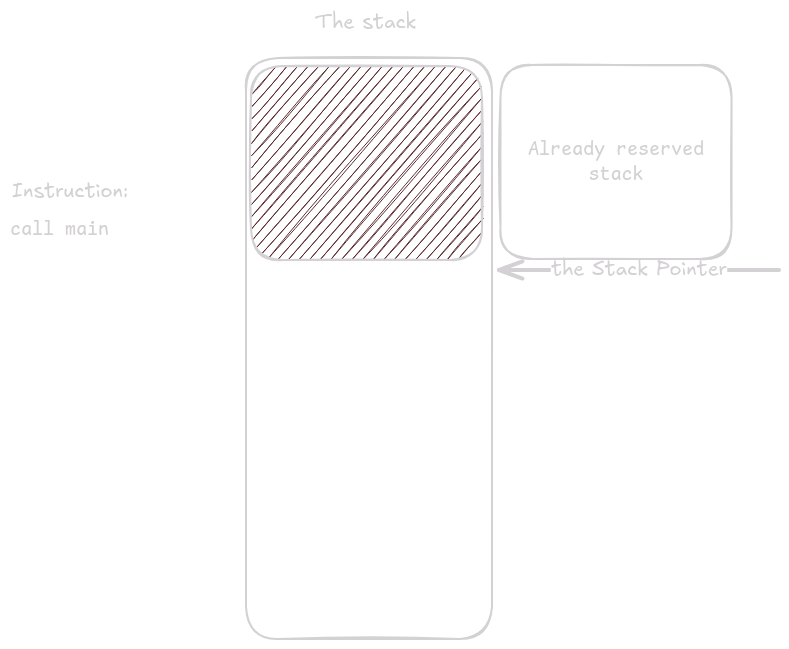
The first instruction in main reserves space for registers we need to store.
Here we only need to store ra.
Even so, we must reserve 16 bytes to keep the stack aligned.
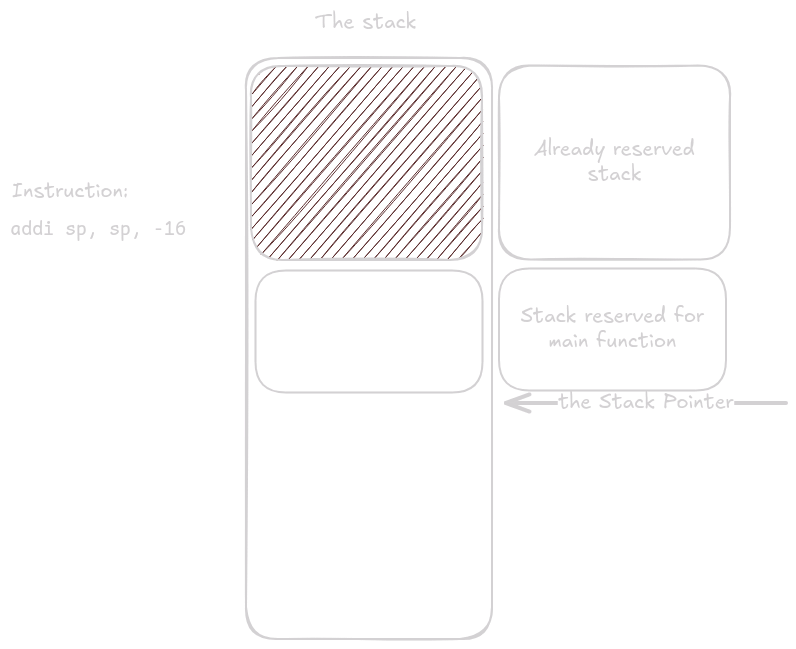
ra is saved at offset 8 from sp.
That leaves 8 bytes of unused space at the top of the stack (remember, the stack grows downward, so the top is at the bottom of the diagrams).
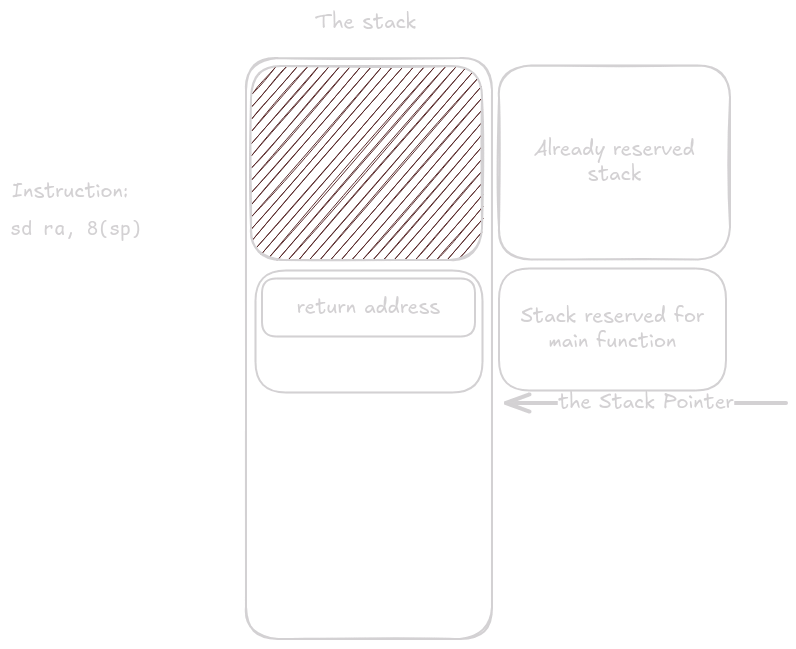
Execution continues inside main().
Eventually the instruction call sum_and_print executes.
sum_and_print() now takes control and begins its prologue.
The first thing it does is allocate stack space.
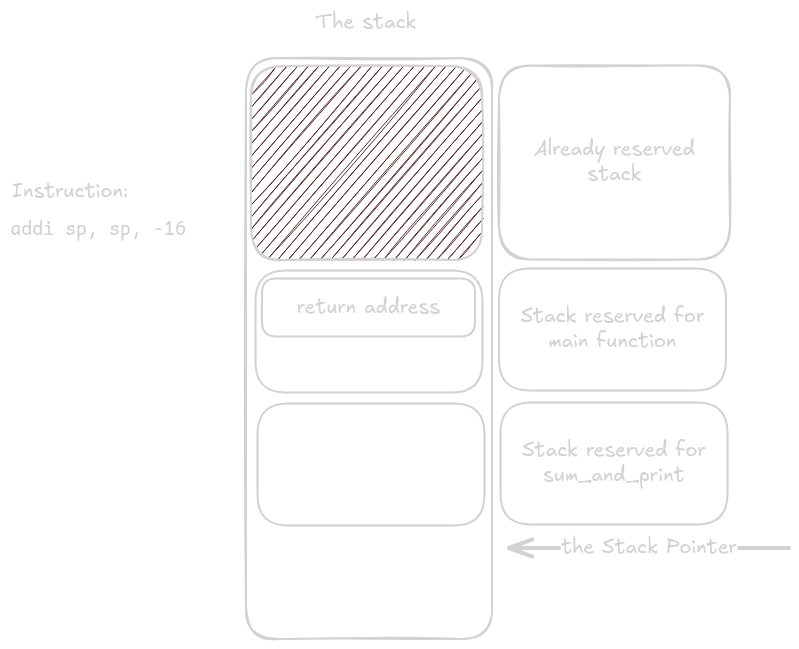
Next it saves registers: first the return address, then any callee-saved registers the function plans to use.
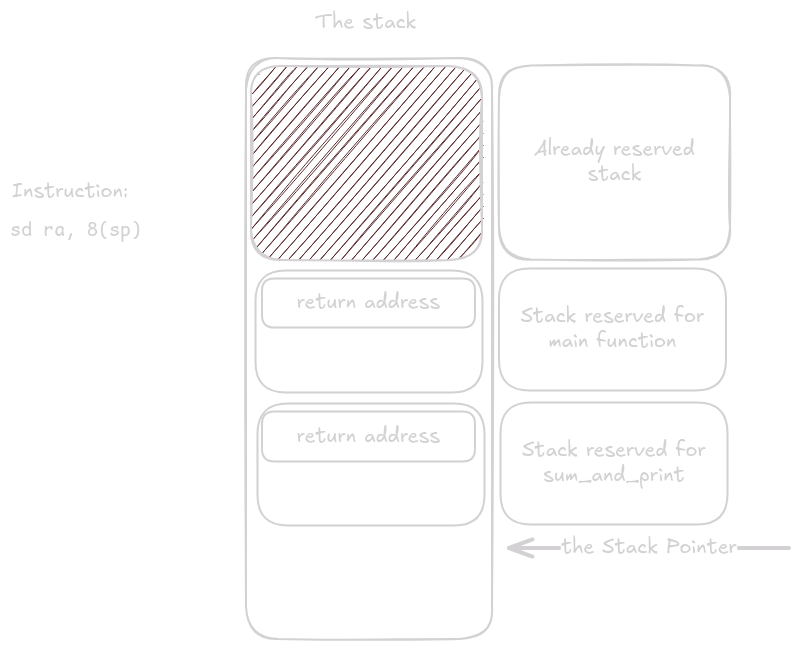
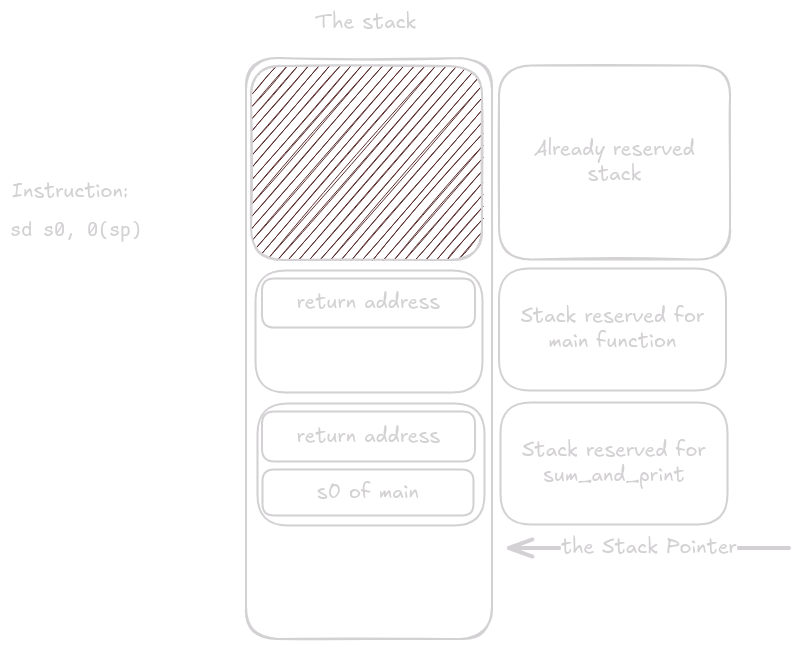
The body of sum_and_print runs.
At some point it calls printf, which, like any other function, reserves and releases space on the stack.
At the end of sum_and_print, after all registers are restored, the reserved stack space is released merely by adding back to the stack pointer.
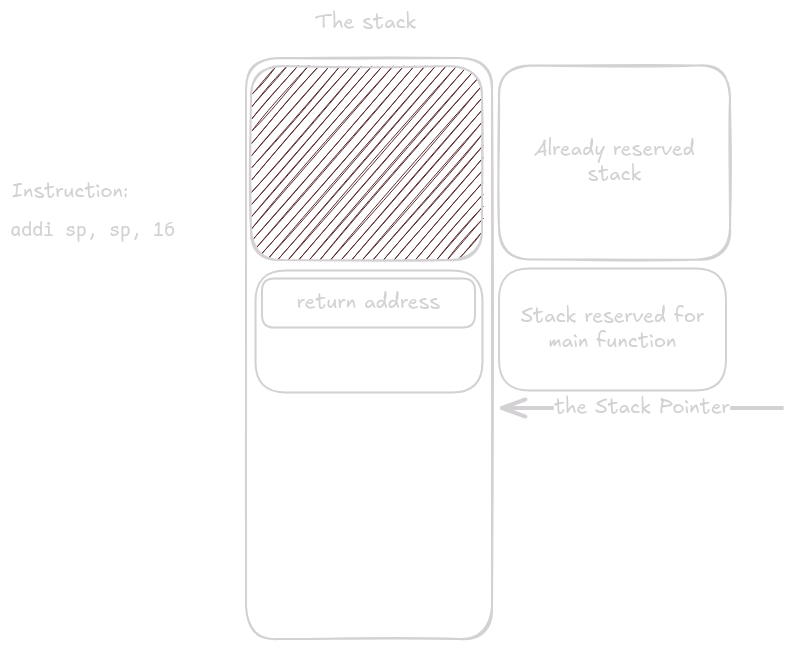
The same thing happens at the end of main().
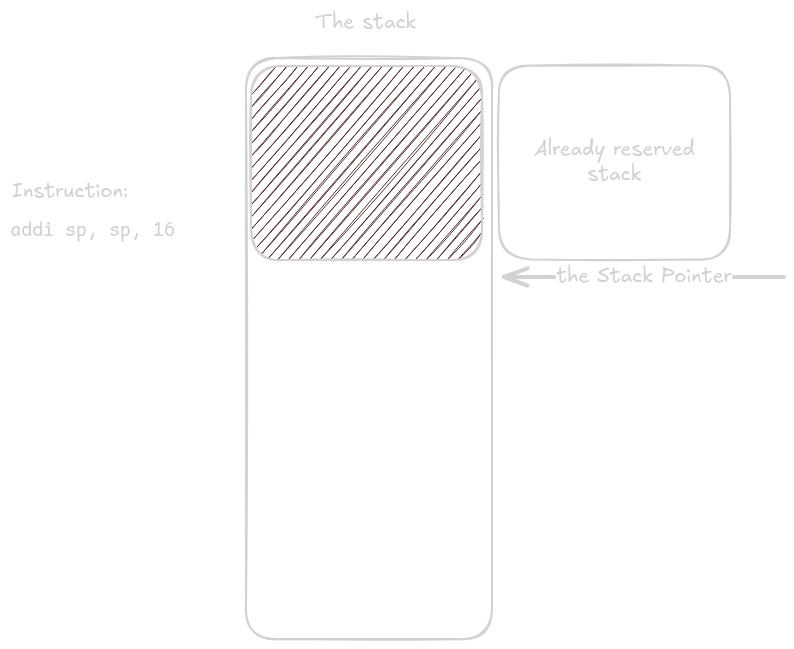
That was straightforward, so let’s look at something more interesting.
This function reads 60 bytes of standard input into the buffer buf:
void fill() {
  char buf[60];
  fgets(buf, 60, STDIN_FILENO);
}
fill:
addi sp, sp, -80
sd ra, 72(sp)
addi a0, sp, 12
li a1, 60
li a2, 0
call fgets
ld ra, 72(sp)
addi sp, sp, 80
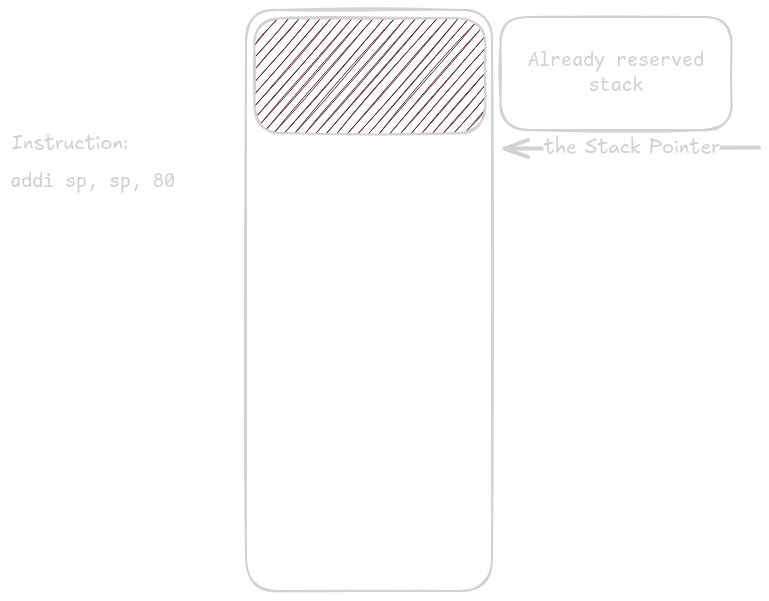
retAs before, there is already some space on the stack reserved before our function takes control.
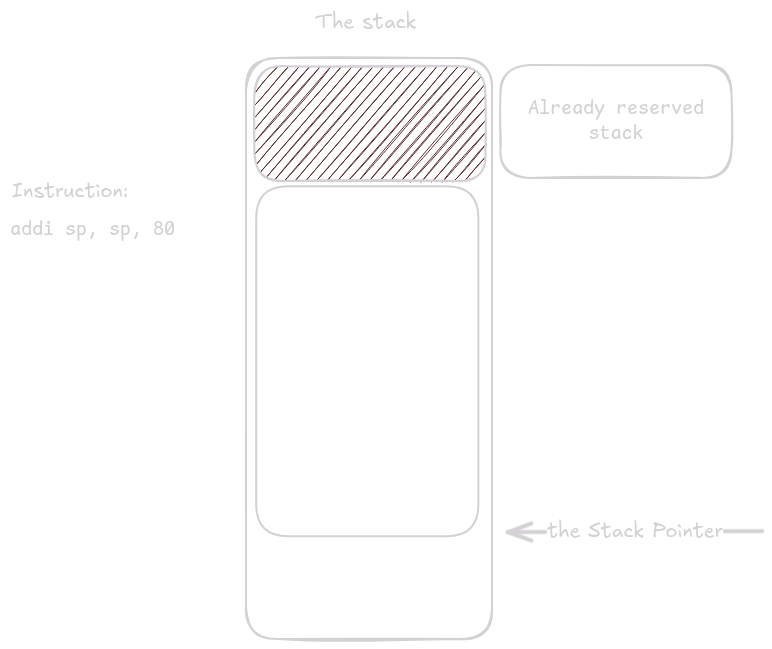
Once it does, it reserves space for all the variables and registers it must store.
Here the function needs 68 bytes, but the stack must be aligned to 16, so it reserves 80 bytes.
The first prologue step is storing ra.
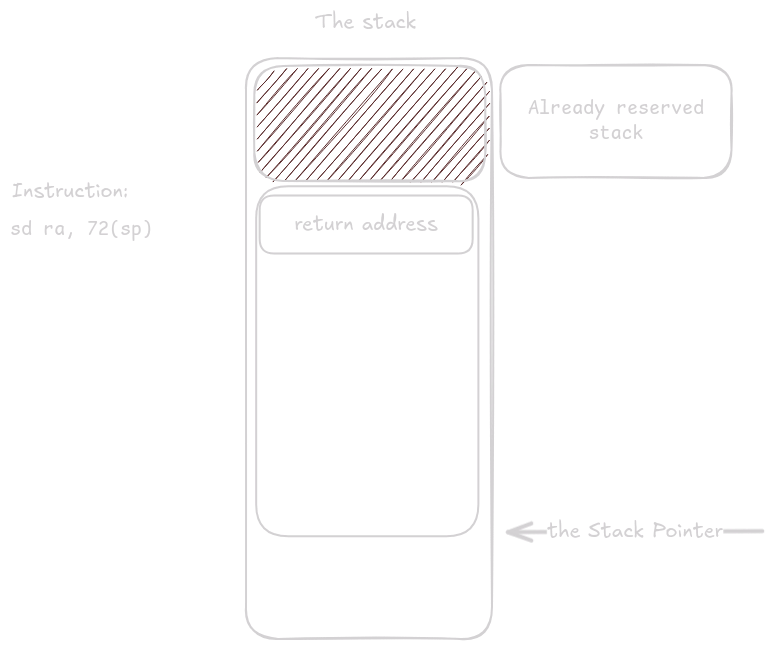
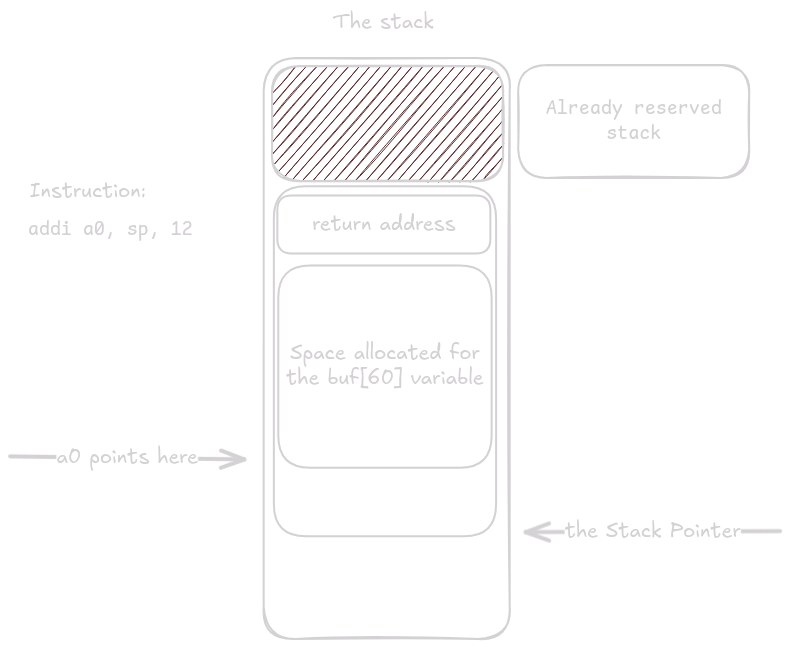
Next we load the address of buf into register a0.
By adding 12 to sp and storing the result in a0, we leave exactly 60 bytes of space between the address in a0 and the saved ra on the stack.
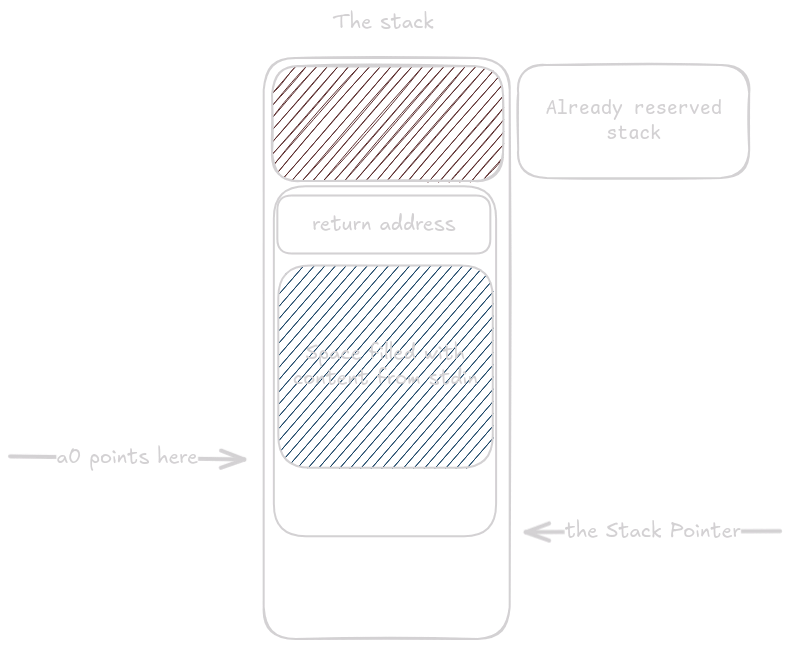
The remaining arguments for fgets go into their designated registers, and fgets() is called.
After fgets() returns, buf contains the characters read from standard input.
At the end of the function the buffer is simply discarded (this is just an example, not a full program).
Now let’s combine everything we’ve learned so far in one last stack example. (Note: in C it is more common to return such values via out-parameters. If the function took an out-parameter as its first argument, the generated assembly would look almost identical.)
struct triple_long {
  long a;
  long b;
  long c;
};

struct triple_long tl(long x) {
  struct triple_long t = {0};
  t.b = x;
  return t;
}

void tl_print() {
  struct triple_long b = tl(3);
  printf("%li\n", b.a);
}
tl:
li a2, 0
sd a2, 0(a0)
sd a1, 8(a0)
sd a2, 16(a0)
ret
tl_print:
addi sp, sp, -32
sd ra, 24(sp)
mv a0, sp
li a1, 3
call tl
ld a1, 0(sp)
.Lpcrel_hi2:
auipc a0, %pcrel_hi(.L.str)
addi a0, a0, %pcrel_lo(.Lpcrel_hi2)
ld ra, 24(sp)
addi sp, sp, 32
tail printf
.L.str:
.asciz "%li\n"As always, stack space is allocated and ra is stored.
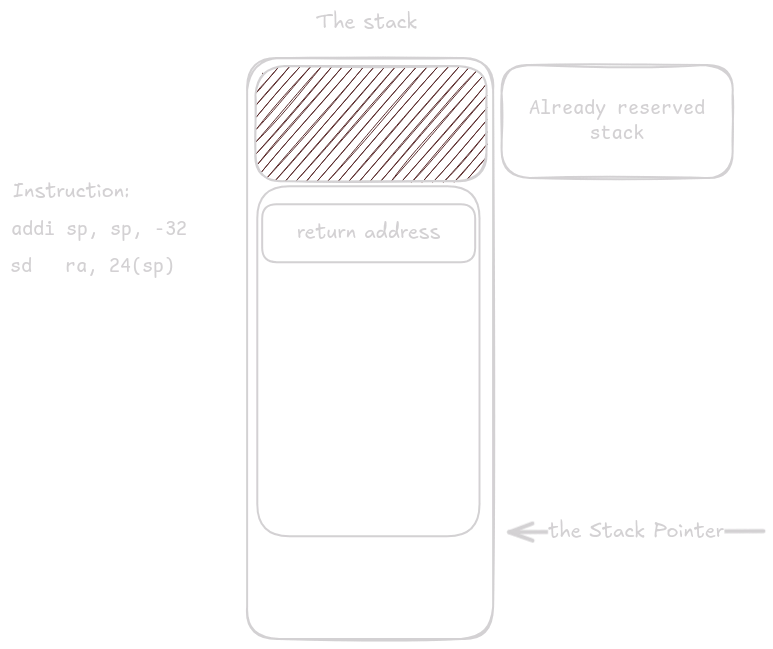
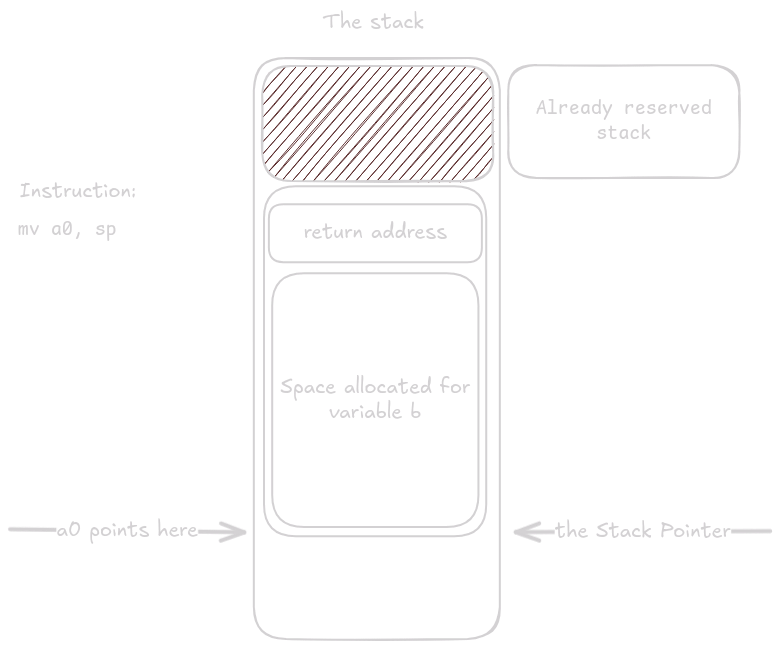
Space was reserved for both ra and the variable b.
Because tl() returns a value that does not fit into one or two registers, it expects the address where it should place the return value as its first argument.
By moving sp into a0, we leave exactly 24 bytes of space for struct triple_long on the stack.
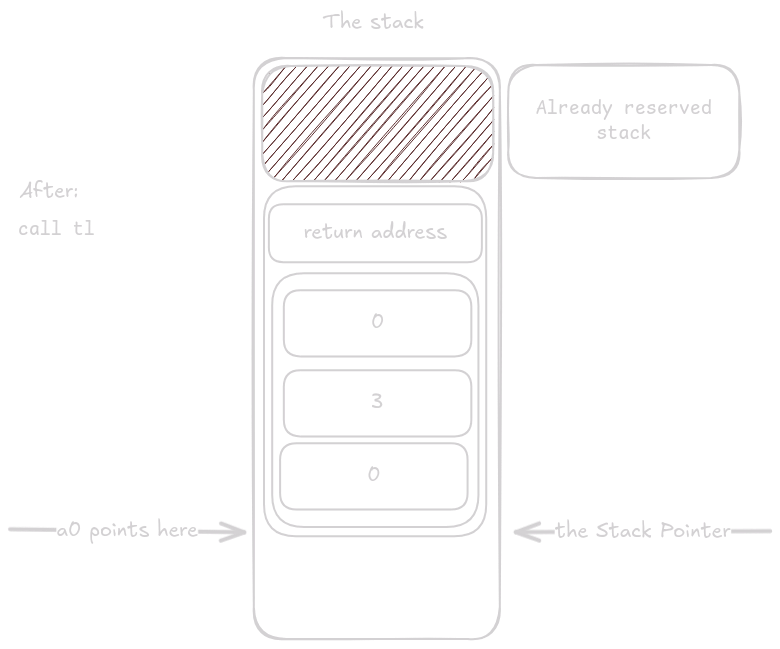
After setting up the arguments, tl() is called.
Because tl() is a leaf function, it does not need a prologue or epilogue.
All it has to do is write the correct values into the reserved space.
Notice how the instructions use offsets from a0 and not sp, because the function has no idea that the memory happens to live on the stack.
Now something peculiar happens.
The function loads the arguments for printf() into the designated registers, but then runs its epilogue.
This is an optimization performed by the compiler called tail call optimization.
The instruction ld ra, 24(sp) loads into ra the return address of the caller that invoked tl_print().
The tail instruction is a special type of call that leaves ra untouched, so when printf() eventually executes ret, the program counter returns to the function that called tl_print().
This saves stack space, which is especially valuable for nested or recursive calls.
printf() now reuses the space previously occupied by tl_print().
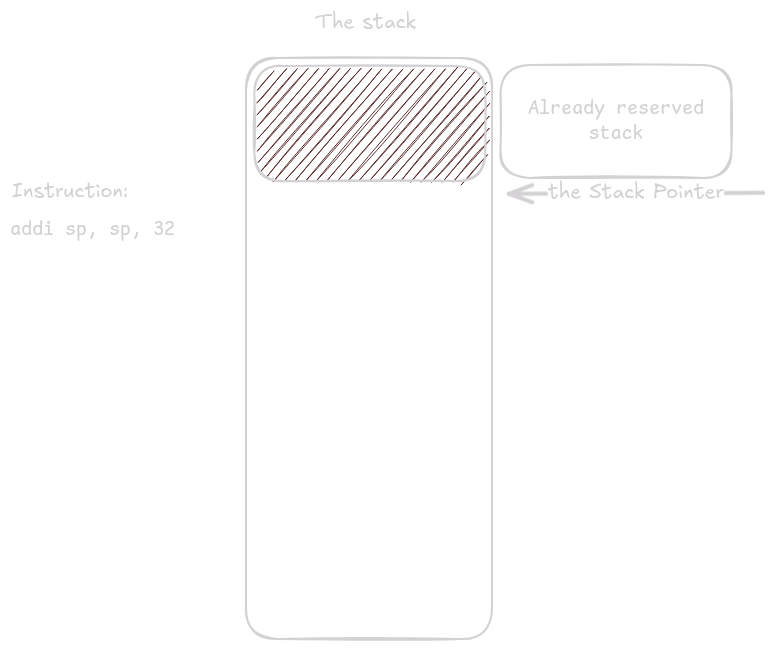
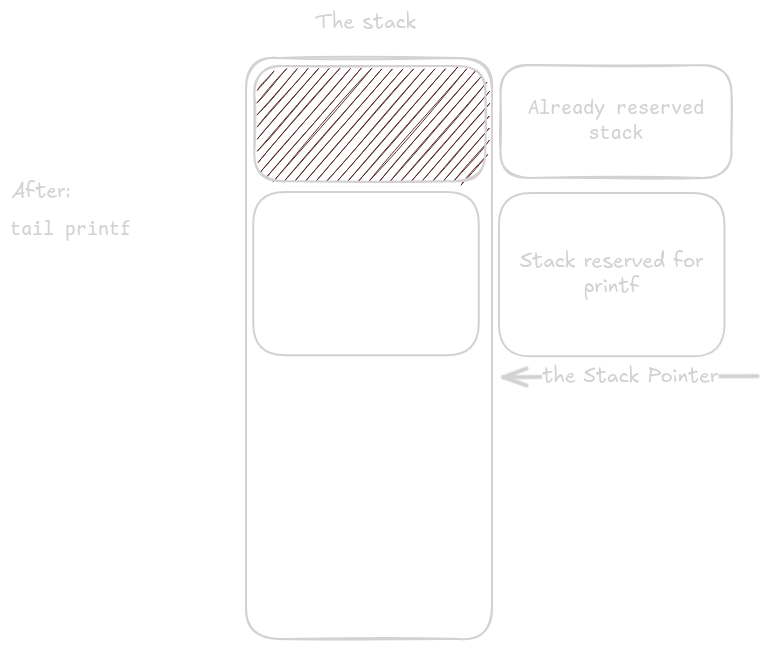
Now that you know how assembly works, it might be tempting to decompile every binary on Earth and hack the Pentagon.
Not so fast: those binaries do not run directly on the CPU, but under an operating system, which adds another layer of complexity.
Even if you don’t plan to hack anything, understanding operating systems is extremely useful for debugging or binary exploitation in CTFs.
In this section I’ll explain some important Linux concepts and show you how to write a simple clone of cat using only assembly, with no external help (well, almost none).
If you want to follow along, the easiest approach is to set up a RISC-V VM using this guide.
So far we’ve talked about adding, subtracting, jumping, calling, loading, and storing on the stack—but how do we print something to the terminal with nothing but this toolkit? Spoiler: you can’t. At least not alone. You need help from the operating system. If you want to read, write, or request more memory, you must ask the system. Even when you want to exit, you have to ask. Here’s a simple “Hello, World” program that uses only syscalls:
.section .data  # section which contains already initialized data of our program
hello:
    .asciz "Hello, World!\n"

.section .text  # section which stores the code of our binary
.globl _start   # this is directive which makes the _start symbol accessible outside of the binary
_start:
    li a0, 1        # file descriptor
    la a1, hello    # data
    li a2, 14       # length
    li a7, 64       # write syscall number
    ecall

    li a0, 0        # exit code
    li a7, 93       # exit syscall number
    ecall
We load arguments just like when calling any other function, except for the last argument.
The last argument (in a7) is the syscall number.
To find out which syscalls exist and their numbers, look here or here.
The numbers depend on the architecture and OS, so x86 has different ones.
To learn how a syscall works, you check the documentation describing which arguments it expects.
Every syscall has its own man page you can read with man 2 <syscall name> (run man man to learn more about man pages).
For example, man 2 write tells us the type signature ssize_t write(int fd, const void buf[.count], size_t count);.
We then place the arguments according to the calling convention.
The first argument int fd is the file descriptor to write to.
Here we use descriptor 1, which is always standard output.
The second argument is a pointer to the buffer holding the data, and the third is the number of bytes to write.
In this case we want the data from label hello and we want to write 14 bytes (the length of Hello, World\n).
Once the arguments are in place—including the syscall number—we execute ecall and let the system do the rest.
We usually don’t call syscalls manually in C or assembly.
Instead we use wrappers such as fgets() (from the earlier example) or printf(), which offer higher-level functionality.
These wrappers can also perform extra checks to make the syscall more efficient.
Just remember that syscalls are C functions inside the kernel. If you write assembly by hand, you must save any registers the syscall won’t preserve (just as you would for a normal function call).
Up to now we dealt only with data of fixed size, but what if we want to store something like a vector whose size can change at any time? We cannot put it on the stack, where data is neatly stacked. This is where pages come in—you can request them from the system and get extra memory on demand.
Paging gives us two huge benefits: fragmentation is not an issue, and you cannot see other processes’ memory. When you request a page, you receive a pointer within your virtual address space. On Linux and most modern systems, individual processes do not share an address space; each process has its own virtual space that other processes cannot see, and that space is mapped onto physical memory.
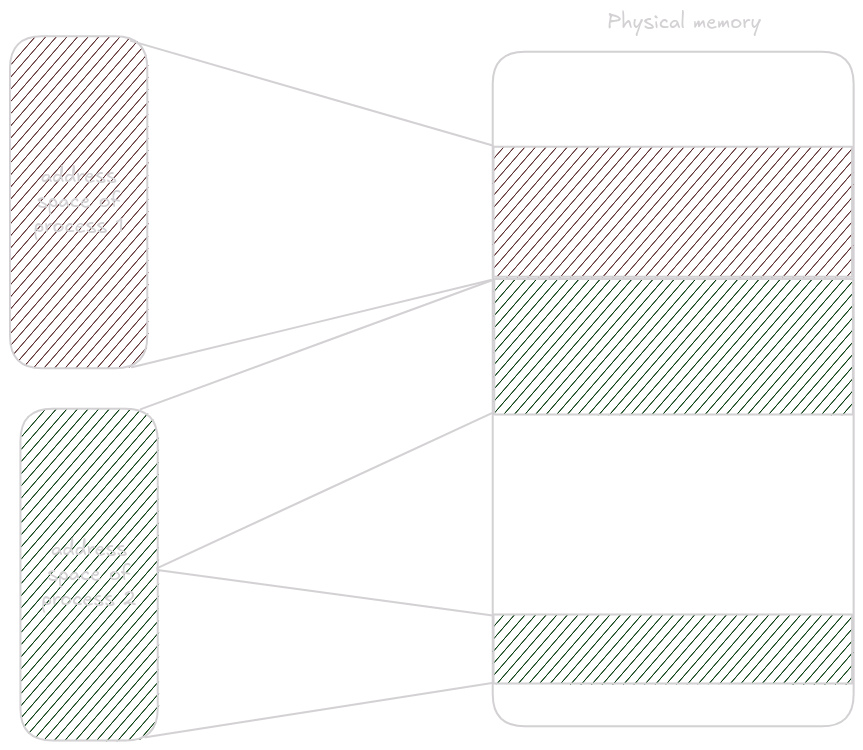
This dramatically increases process isolation, preventing others from peeking into your memory. It also means a process can have its memory split across separate regions in physical memory without knowing it.
Physical memory is divided into pages, and these physical pages are mapped to virtual pages by the memory management unit.
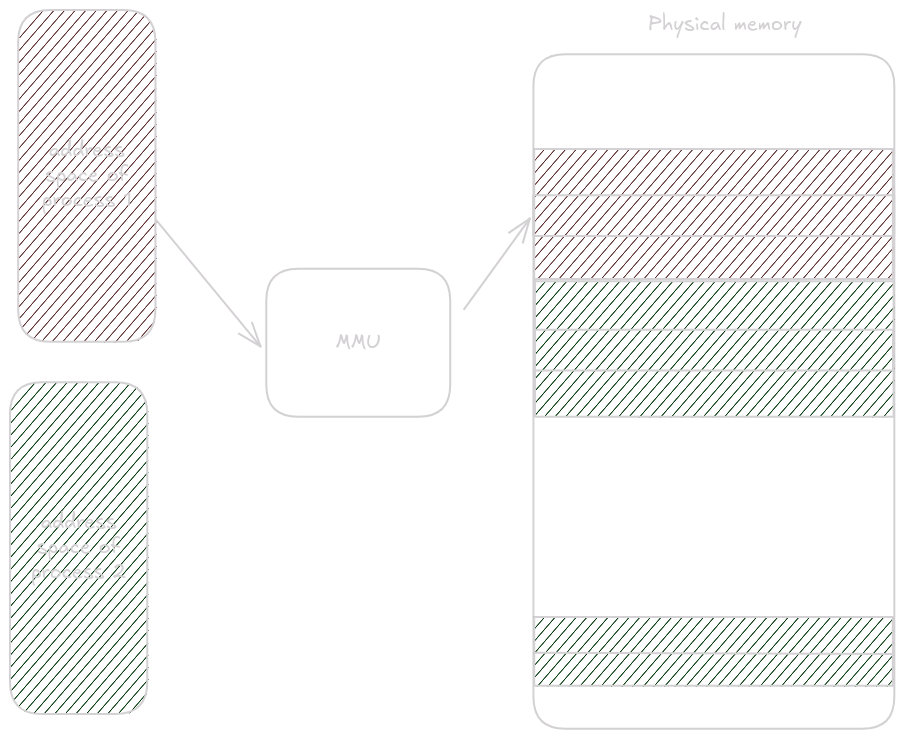
The default Linux page size is 4096 bytes, which you can verify with getconf PAGE_SIZE.
4096 bytes can be addressed with 12 bits, so when translating from virtual to physical addresses, the last 12 bits are copied directly; the MMU translates the rest.
To request a page in assembly we use the mmap syscall and later munmap to release it.
Consult man 2 mmap for the meaning of each argument.
The important one is fd = -1, which indicates that the page is anonymous (not backed by a file) and should come from memory.
.section .text
.global _start

_start:
    # Get the page
    li a0, 0                               # NULL address hint
    li a1, 4096                            # length of the page
    li a2, 3                               # PROT_READ | PROT_WRITE
    li a3, 34                              # MAP_PRIVATE | MAP_ANONYMOUS
    li a4, -1                              # fd argument for mmap
    li a5, 0                               # offset argument for mmap
    li a7, 222                             # syscall number for mmap
    ecall

    # The address where the page is mapped is in a0
    # Save it for later unmapping
    mv s0, a0

    # Unmapping the page
    mv a0, a1                              # Move mmap address to a0
    li a1, 4096                            # length of the page
    li a7, 215                             # syscall number for munmap
    ecall

    # Exit
    li a7, 93                            # syscall number for exit
    li a0, 0                             # exit code 0
    ecall
Build it with as mmap.asm -o mmap.o; ld mmap.o -o mmap.
cat in assemblyTo build the following examples run as cat.asm -o cat.o; gcc cat.o -o cat.
gcc adds the code that invokes the function main (which we will write) with the signature int main(int argc, char *argv[]).
This gives us much easier access to the command-line arguments passed to the binary (we could retrieve them manually, but there is no need).
We’ll implement a simplified version of cat that prints the contents of the file provided as the first argument.
For example, ./cat cat.asm prints the contents of cat.asm.
We’ll open the provided file, request a memory page from the system, loop over the file, read it into the page, and print the page contents to standard out.
First we have to define our .section .text and mark main as global so gcc can find it while linking.
.section .text
.globl main
main:
The prologue begins next.
Because we will make syscalls, we must save the ra register.
    addi sp, sp, -16
    sd ra, 8(sp)
If we need to preserve additional registers, we must allocate more stack space and save them in the prologue.
Now let’s check whether the correct number of arguments was provided.
int argc is the first argument to main, so it will be in register a0.
We expect two arguments, because if the binary is invoked as ./cat cat.asm, the argv array looks like ["./cat", "cat.asm"].
    # Check if the number of arguments is correct
    li t0, 2                               # Number of arguments
    bne a0, t0, .error_exit
Okay, now we write .error_exit, which sets the return value to an error and exits the program.
.error_exit:
    # Exit with error code (-1)
    li a0, -1                              # exit code
    j .epilogue
And obviously we need .epilogue:
.epilogue:
    ld ra, 8(sp)
    addi sp, sp, 16
    ret
Remember: any change to the prologue must be mirrored in the epilogue.
What we have so far should resemble this:
.section .text
.globl main
main:
    addi sp, sp, -16
    sd ra, 8(sp)

    # Check if the number of arguments is correct
    li t0, 2                               # Number of arguments
    bne a0, t0, .error_exit

    # This is where the rest of the function will go

.error_exit:
    # Exit with error code (-1)
    li a0, -1                              # exit code
    j .epilogue

.epilogue:
    ld ra, 8(sp)
    addi sp, sp, 16
    ret
If you compile and run this now, the binary will exit with a different code depending on how many arguments you pass.
Use echo $? to see the exit code.
Now that we’re sure the argument count is correct, we can open the file:
    # Open the file specified in argv[1]
    li a0, -100                            # a0 = AT_FDCWD
    ld a1, 8(a1)                           # a1 = argv[1]
    li a2, 0                               # a2 = O_RDONLY
    li a7, 56                              # syscall number for sys_openat
    ecall

    # Store file descriptor
    mv s0, a0

    # Check for open failure
    bltz a0, .error_exit
-100 as the first argument is a special constant defined in the syscall docs telling it to treat the path as relative.
We then store the returned file descriptor in s0 (remember to add this register to the prologue and epilogue).
Finally we check whether the descriptor is valid.
The docs say a negative return value means failure, so we use bltz a0, .error_exit (branch if a0 is less than zero).
Next we request a page from the system.
At the top of the file we add a .section .data so we can change the page size later, and to keep a single source of truth for the buffer size.
.section .data
    buffer_size: .quad 4096                 # Define the buffer size for reading
To obtain the page we call mmap:
    # Allocate memory using mmap
    li a0, 0                               # NULL address hint
    ld a1, buffer_size                     # Get buffer_size
    li a2, 3                               # PROT_READ | PROT_WRITE
    li a3, 34                              # MAP_PRIVATE | MAP_ANONYMOUS
    li a4, -1                              # fd argument for mmap
    li a5, 0                               # offset argument for mmap
    li a7, 222                             # syscall number for mmap
    ecall

    # Store mmap address
    mv s1, a0

    # Check for mmap failure
    bgez a0, .read_loop

    # Exit with error code if mmap failed
    j .error_exit
If the return value is non-negative we start reading; otherwise we exit with an error.
We store the page pointer in register s1 (remember to add it to the prologue and epilogue again).
Now we can write the .read_loop:
.read_loop:
    # Read from file
    mv a1, s1                              # Move mmap address to a1
    ld a2, buffer_size                     # Get buffer_size
    mv a0, s0                              # Move file descriptor to a0
    li a7, 63                              # syscall number for read
    ecall

    # Check if read returned 0 (EOF)
    beq a0, zero, .close_fd

    # Check for read errors
    blt a0, zero, .error_exit
First we read buffer_size bytes from the file descriptor (s0) into the page whose pointer lives in s1.
The read syscall keeps track of how far into the file we are, so the next call continues where the previous one left off.
This lets us read the entire file in a loop.
The return value is the number of bytes read if the syscall succeeds, zero if we reached EOF, and negative if there was an error.
Immediately after reading we want to write the page to standard out:
.read_loop:
    # Read from file
    mv a1, s1                              # Move mmap address to a1
    ld a2, buffer_size                     # Get buffer_size
    mv a0, s0                              # Move file descriptor to a0
    li a7, 63                              # syscall number for read
    ecall

    # Check if read returned 0 (EOF)
    beq a0, zero, .close_fd

    # Check for read errors
    blt a0, zero, .error_exit

    # Write to stdout
    mv a2, a0                              # Number of bytes to write
    mv a1, s1                              # Read from the page
    li a0, 1                               # File descriptor 1 (stdout)
    li a7, 64                              # syscall number for write
    ecall

    # Continue reading
    j .read_loop
The number of bytes read is returned in a0.
The write syscall expects the byte count in a2.
Register a0 holds the descriptor to write to—in this case standard output, which is descriptor 1.
We want to read data from the page stored in s1.
Lastly we update the branch for the EOF case. It’s good practice to close the file and unmap the page as soon as we’re done with them. Instead of jumping straight to the epilogue, the branch goes to a cleanup routine first:
    # Check if read returned 0 (EOF)
beq a0, zero, .close_fd.close_fd:
# Close the file descriptor
mv a0, s0 # Move file descriptor to a0
li a7, 57 # syscall number for close
ecall
# Unmap memory
mv a0, a1 # Move mmap address to a0
ld a1, buffer_size # Get buffer_size
li a7, 215 # syscall number for munmap
ecall
li a0, 0 # exit code
j .epilogueAfter this cleanup everything is done.
The final code should look like this:
.section .data
buffer_size: .quad 4096 # Define the buffer size for reading
.section .text
.globl main
main:
addi sp, sp, -32
sd ra, 24(sp)
sd s0, 16(sp)
sd s1, 8(sp)
# Check if the number of arguments is correct
li t0, 2 # Number of arguments
bne a0, t0, .error_exit
# Open the file specified in argv[1]
li a0, -100 # a0 = AT_FDCWD
ld a1, 8(a1) # a1 = argv[1]
li a2, 0 # a2 = O_RDONLY
li a7, 56 # syscall number for sys_openat
ecall
# Store file descriptor
mv s0, a0
# Check for open failure
bltz a0, .error_exit
# Allocate memory using mmap
li a0, 0 # NULL address hint
ld a1, buffer_size # Get buffer_size
li a2, 3 # PROT_READ | PROT_WRITE
li a3, 34 # MAP_PRIVATE | MAP_ANONYMOUS
li a4, -1 # fd argument for mmap
li a5, 0 # offset argument for mmap
li a7, 222 # syscall number for mmap
ecall
# Store mmap address
mv s1, a0
# Check for mmap failure
bgez a0, .read_loop
# Exit with error code if mmap failed
j .error_exit
.read_loop:
# Read from file
mv a1, s1 # Move mmap address to a1
ld a2, buffer_size # Get buffer_size
mv a0, s0 # Move file descriptor to a0
li a7, 63 # syscall number for read
ecall
# Check if read returned 0 (EOF)
beq a0, zero, .close_fd
# Check for read errors
blt a0, zero, .error_exit
# Write to stdout
mv a2, a0 # Number of bytes to write
mv a1, s1 # Read from the page
li a0, 1 # File descriptor 1 (stdout)
li a7, 64 # syscall number for write
ecall
# Continue reading
j .read_loop
.close_fd:
    # Close the file descriptor
    mv a0, s0                              # Move file descriptor to a0
    li a7, 57                              # syscall number for close
    ecall

    # Unmap memory
    mv a0, a1                              # Move mmap address to a0
    ld a1, buffer_size                     # Get buffer_size
    li a7, 215                             # syscall number for munmap
    ecall

    li a0, 0                               # exit code
    j .epilogue
.error_exit:
# Exit with error code (-1)
li a0, -1 # exit code
.epilogue:
ld ra, 24(sp)
ld s0, 16(sp)
ld s1, 8(sp)
addi sp, sp, 48
retAnd that’s it!
Short introduction to how assembly and operating systems work